How To Use Remote Control STARLIGHT
Last updated: 18 Dec 2024
9272 Views
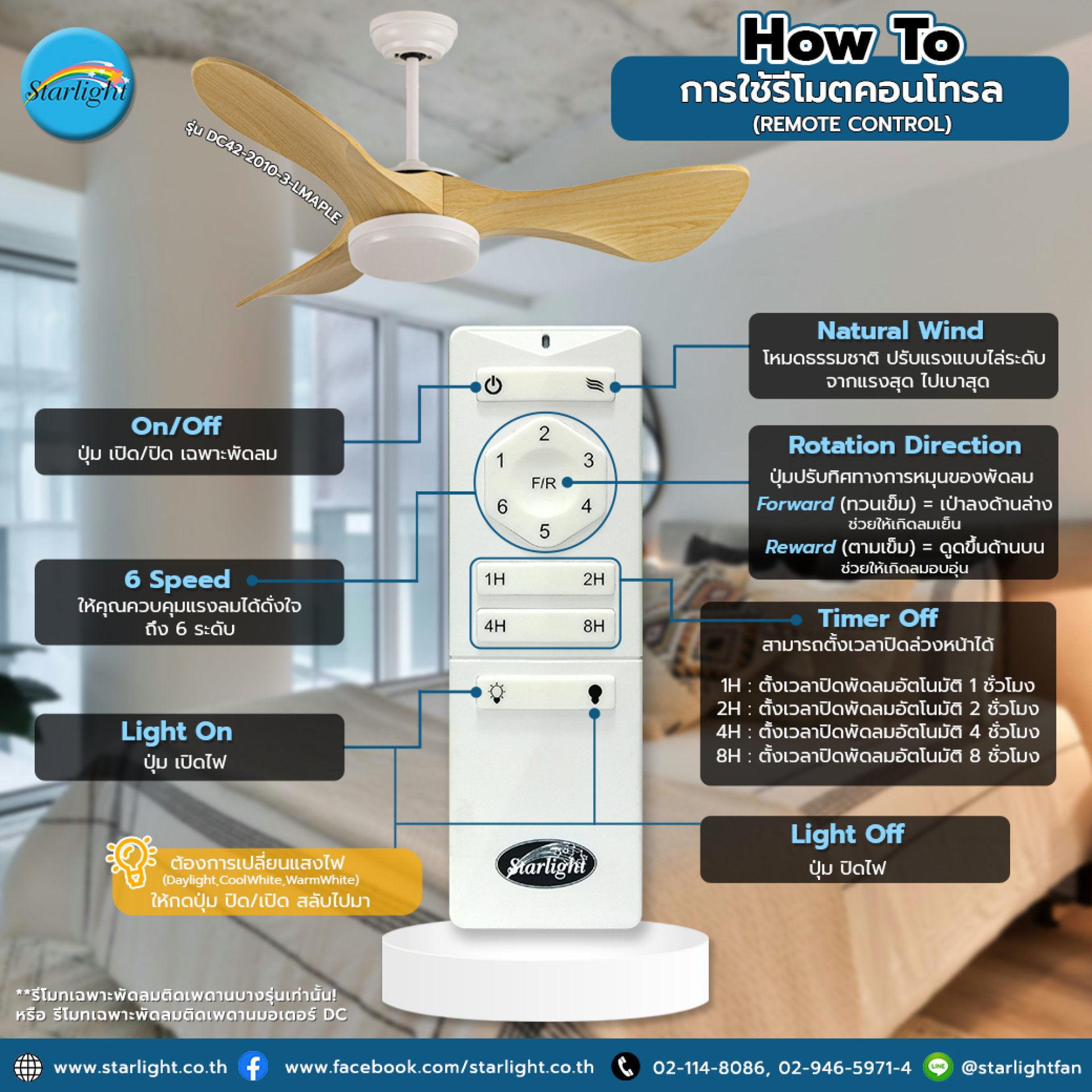
How To Use Remote Control For example, the DC42-2010-3-LMAPLE Lamp Fan
Many people still don't know how to use the remote control, right? Sometimes it's not pleasing. If you know what each button can do, it will make using a ceiling fan more worthwhile.
Let's get to know the various buttons on the #STARLIGHT Remote
Many people still don't know how to use the remote control, right? Sometimes it's not pleasing. If you know what each button can do, it will make using a ceiling fan more worthwhile.
Let's get to know the various buttons on the #STARLIGHT Remote
- On/Off: Fan-only On/Off button
- Natural Wind: Natural mode, adjust the power gradually from the strongest to the weakest
- 6 Speed: Let you control the wind power as you wish, up to 6 levels
- Rotation Direction: Button to adjust the direction of the fan rotation Forward (counterclockwise) = blow down, helping to create cool wind, Reward (clockwise) = suck up Helps create warm wind
- Timer Off: Can set the time to turn off in advance 1H: Set the time to turn off the fan automatically for 1 hour, 2H: Set the time to turn off the fan automatically for 2 hours, 4H: Set the time to turn off the fan automatically for 4 hours, 8H: Set the time to turn off the fan automatically for 8 hours
- Light On/Off: On/Off button, if you want to change the light (Daylight, CoolWhite, WarmWhite), press the On/Off button to switch back and forth
**Remote control only for some ceiling fans! Or remote control only for DC motor ceiling fans
Starlight meets every lifestyle with factory standards
Related Content

If you still have symptoms of abnormal shaking or shaking Adjust the vibration by the following methods
12 Mar 2024
If you are thinking of installing a ceiling fan in a room that uses downlights. The important thing to consider is not to let the downlight be above the ceiling fan or your room will have flashing lights. Starlight has the following recommendations
13 Mar 2024

Is your home feeling stuffy due to poor ventilation? A ceiling fan might be the answer you're looking for! But the question is, how high or low are your ceilings? Which ceiling fan is right for your home? How should you install it for maximum efficiency?
17 Sept 2025

